Your workday,
remembered.

An automatic time tracker for Mac. It runs from the menu bar, notes every app, window and meeting locally, then drafts the time entries you'd bill for you to approve.

Free with your own API key · 14-day Pro trial · No account needed

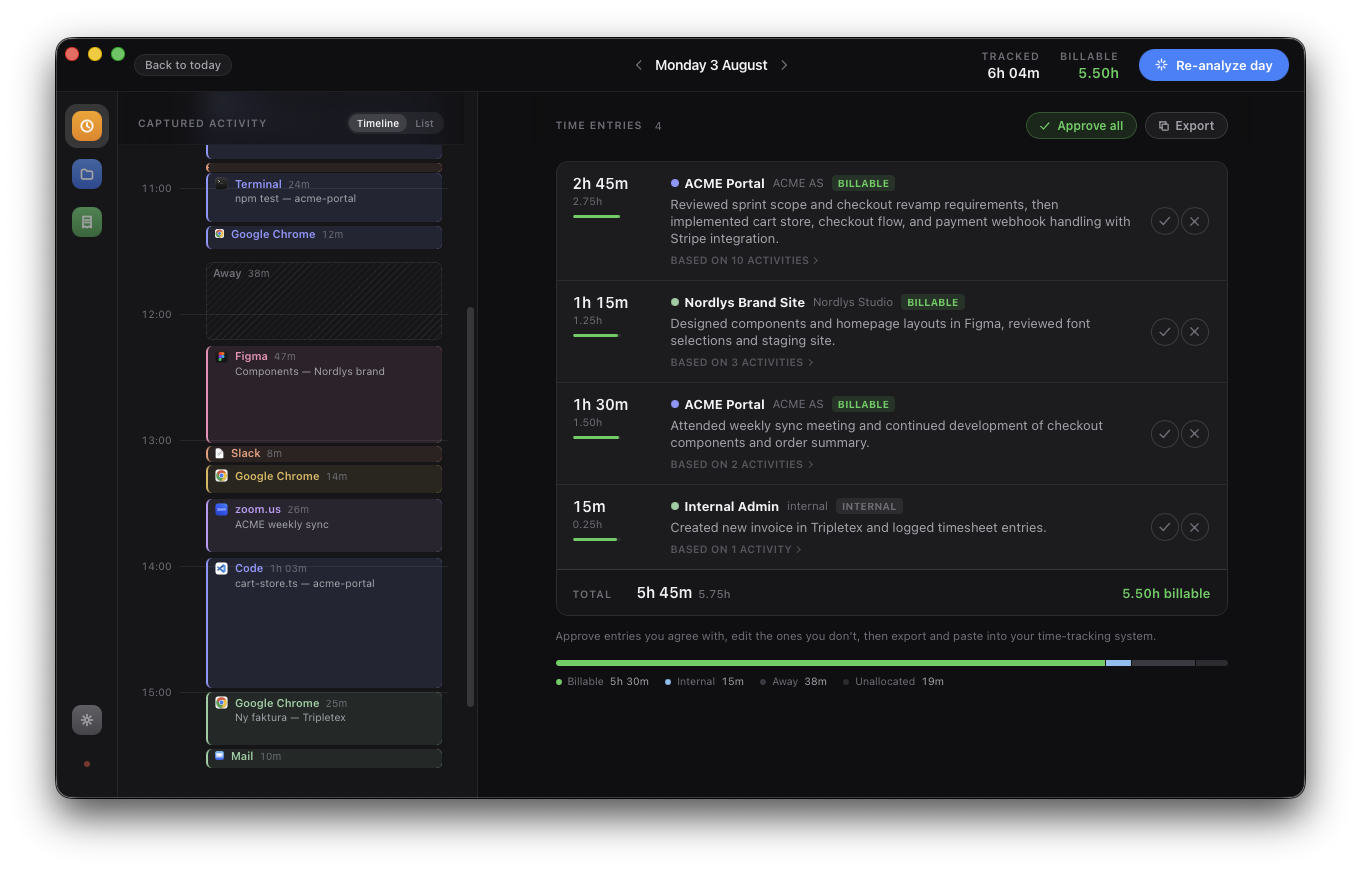
Glossa on a Mac: the day's captured activity per app on the left, AI-drafted time entries with billable totals ready for approval on the right.

See where the day went.

The timeline shows your day as it happened, sampled every 5 seconds: each app session, meeting and break. Zoom into a messy morning, or flip to the digest and see the day summed per app and project. Away time is detected. Personal browsing is marked and stays private.

Then it suggests your entries.

When you ask, Glossa reads the day and drafts time entries: grouped by client, written in plain language, streaming in while it works. They're suggestions, not bookkeeping. Every draft cites the activity it's based on, minutes are capped by that evidence, and nothing reaches a timesheet without your approval.

Always capturing. Drafting only when you ask.

  1. 1

    Capture, locally

    A lightweight native sampler notes the front-most app and window title every 5 seconds, into a SQLite file on your Mac that you can open yourself. Idle time is never billed, and password managers are excluded from capture by default.

  2. 2

    Analyze on your terms

    One day's summary is processed by Glossa AI, which drafts entries in seconds. Personal browsing is filtered out before anything leaves your machine.

  3. 3

    Approve & invoice

    Review each draft against the exact activity it cites. Approve, then export to the tools you already use. Or send a clean PDF invoice straight from Glossa, with minimum billing applied.

Want the full walkthrough, permissions and all? Read how Glossa works

Your day is none of our business.

No cloud database, no account required to run, no telemetry. The only thing that ever leaves your Mac is one day's summarised activity, and only when you press Analyze. On the free tier your own key sends it straight to your AI provider. On the paid tier it passes through Vercel AI Gateway to Anthropic under their API terms. I keep no copy, because I run no server to keep one on.

glossa.db, in your home folder

Your captured day lives in a SQLite file you can open with any tool. Back it up, inspect it, delete it. It's yours.

One summary, on demand

Anything matching your personal-activity list is stripped on your Mac before the summary is built: Facebook, Netflix, VG and ten more by default, and you can edit the list. Whole apps can be excluded from capture entirely.

No lock-in

Prefer your own AI key? The free tier runs on it forever, and your summary never routes through me at all.

Starts free. Pays for itself weekly.

Free
$0
forever · bring your own AI key
  • Automatic local capture
  • Day timeline & activity digest
  • AI analysis with your API key
  • Export to any tool
Download
Glossa AI Popular
$2.99 /mo
or $29/year · no setup, no key
  • Everything in Free
  • AI included — works out of the box
  • Entries stream in seconds
  • Calendar integration
Start 14-day trial
Pro
$8.99 /mo
or $89/year · the whole business
  • Everything in Glossa AI
  • Invoicing with clean PDF output
  • Per-project rates & minimum billing
  • Priority support
Start 14-day trial

Consultancy? Team is $10/seat/month billed yearly, minimum 5 seats, with everything in Pro for everyone. Talk to me

Questions

What exactly is sent to the AI?

Nothing, until you press Analyze. Then a single day's summarised activity log: app names, window titles and durations, for that day only, with personal browsing already filtered out locally. On the free tier your own key sends it straight to your provider and I never see it. On the paid tier it passes through Vercel AI Gateway to Anthropic under their API terms, and I keep no copy.

Why does Glossa need the Screen Recording permission?

macOS gates window titles behind that permission. It is how Glossa knows "Chrome, Stripe docs" instead of just "Chrome". Glossa never records, captures, or stores your screen. Without the permission it still works, with app names only.

Is this employee monitoring software?

No, and structurally rather than as a policy. There is no server that collects activity, so there is nothing a manager could see. On team licences each person's data stays on their own Mac. What leaves Glossa is what you approve and export: your timesheet.

What happens when I get a new Mac?

Apple's Migration Assistant brings your Glossa data along automatically, and your licence covers two Macs with self-serve deactivation. The database is a single SQLite file in your home folder, so copying it across by hand works too.

Can I cancel anytime?

Yes, in one click through the customer portal. Your data stays on your Mac either way: the free tier keeps working with your own key, and export always works.